
LinkedList

How a LinkedList Looks:
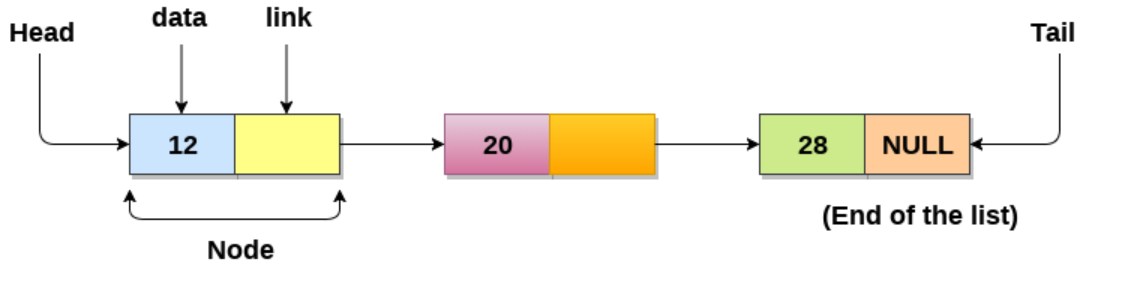
A node contains only two things: data and a reference to the next node, which is set to null by default.
First, we are going to create an empty node.
class Node{
    constructor(data,next = null) {
        this.data = data
        this.next = next
    }
}

class LinkedList {
    constructor() {
        this.head = null
    }
}
The Node class represents an element in the linked list. Each node contains two properties:
The constructor takes two arguments:
data: This property holds the data or value.
next: This property holds the reference to the next node.
The LinkedList class represents the entire linked list.
head: This property holds a reference to the first node in the linked list. If the list is empty, head is set to null.
Insert at start
This node is currently empty, but we can add data to it.
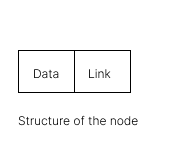
First, we create an algorithm to add data to the head.
step1: Take the data.
step2: Convert it to a node.
step3: Add this node to the head.
We use the same node as in the code above.
LinkedList.prototype.insertAtStart = function(data) {
const newNode = new Node(data);
//add data to it head
this.head = newNode
}
Insert at End

First, we create an algorithm to add data to the Tail.
First, check if head is null. If it is, add the data to it.
If the head is not null, go to the end.
Let's assume the head is the last node. Check if last.next is null. If it is, add the data to it. If last.next is not null, update the last node with the new value.
LinkedList.prototype.insertAtEnd = function(data) {
const newNode = new Node(data);
//check if head is null or not
if(!this.head){
//if head is null then add data to it
this.head = newNode
};

let last = this.head
//we check last.next is null or not
if(last.next){
last = last.next
}
// last.next is null then add data to it
last.next = newNode
}
Insert at given node
First, we create an algorithm to add data at any given point.

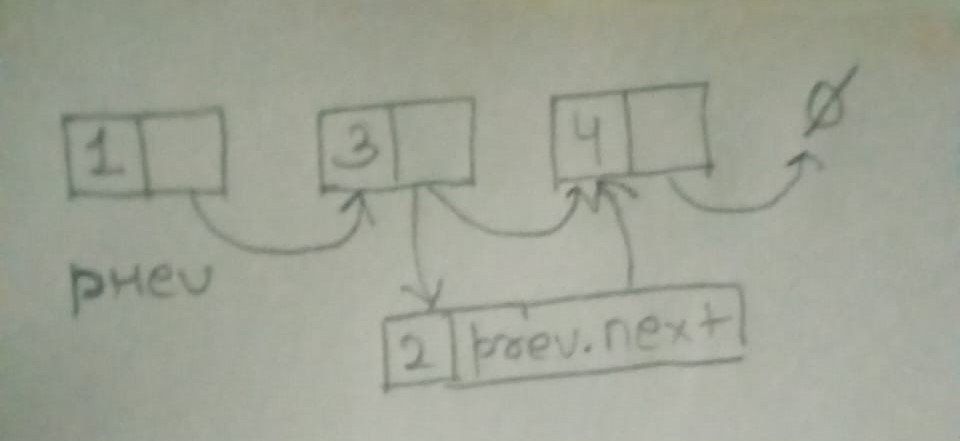
For example, if we need to add data to the second node, we need to know the previous data. We get the previous data from the user. If the user provides the previous data, we take it and update the value with the new data.
LinkedList.prototype.insertAtStart = function(prevNode,data) {
if(!prevNode){
console.log("PrevNode da bhai nahi too code run nahi hoga kya backchodi kar raha!!")
return
}
//we don't take prevNode beacuse prevNode have both value data and next that reason we take only prevNode.next
const newNode = new Node(data,prevNode.next);
//just update the value
prevNode.next = newNode
}
Delete First Node

We need to delete the head node.
First, we check if the head is null; if it is, we simply return.
If head.next is null, we set head to null.
If head.next is not null, we set this.head to this.head.next.
LinkedList.prototype.deleteFirstNode = function() {
// we check if head is null or not
if(!this.head){
return;
}
//then we check head.next is null or not
if(this.head.next === null){
this.head === null
return;
}
//if head.next is not null then we simply update the value
this.head = this.head.next
}
Delete Last Node

We need to delete the last node.
first we check if head is null then we simply return
second we check if head.next is null then simply we delete the node
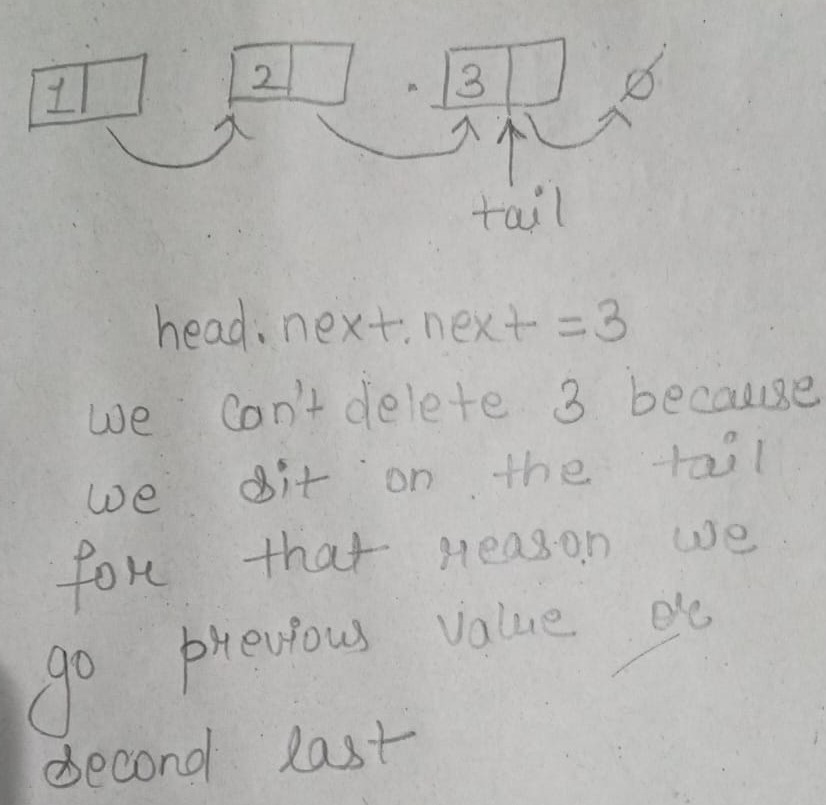
agar hum log tail mai Baithe Honge too hum log kabhi tail ko delete hi nahi kar sakte hai isliye hum log ko second last value mai Jana padta hai tab hum log k pass secondLast.next ka access hota hai .next k through hum log tail ko delete kar sakte hai.
Let's see the code for more clarity.
LinkedList.prototype.insertAtStart = function() {
// first we check head is null or null
if(!this.head){
return;
}
// then we check head.next is null or not
if(!this.head.next){
this.head = null;
return;
}
// then came into the main picture where we have to delete last node
//first make a variable called secondlast
let secondLast = this.head;
// for example our node size 10 then what we can do for that reason we start loop it check secondlast value is null or not if not then we just update the secondLast value
while(secondLast.next.next){
secondLast = secondLast.next;
}
//if secondlast.next  is not null then we simply make the tail  null
secondLast.next = null
}
Delete a node with given key

We need to delete a node with a given key.
first we check if head is null then we simply return
Second, we check if the head's key matches the user's key. If both keys are the same, we delete the head.
If you understand how to delete the last node, it is easy to understand how to delete a node with a given key.
for example agar hum log second node ko delete karna hoga too hum log pahle head.next sa compare Karenge fir agar head.next mai value hoga too fir hum log head.next.data = key compare karenge fir simply this.head.next = this.head.next.next sa replace kar denge
LinkedList.prototype.insertAtStart = function(key) {
// If the list is empty, return false
if(!this.head){
return false;
}
// If the node to delete is the head, update the head and return true
if(this.head.data === key){
this.head = this.head.next;
return true
}

let value = this.head;
while(value.next !== null){
// If the next node is the one to be deleted, update the next pointer and return true
if(value.next.data === key){
value.next = value.next.next
return true
    }
value = value.next
  }
// If the key was not found, return false
   console.log("Node with key " + key + " not found.");
   return false;
}
Search And Traverse a LinkedList

Search with Key
LinkedList.prototype.insertAtStart = function(key) {
const current = this.head
// we check current value null or not
while(current !==  null){
 if (current.data === key) {
    return true
 }
}
return false;
}
Print LinkedList
LinkedList.prototype.insertAtStart = function() {
const current = this.head
let arr = []
while(current !== null){
arr.push(current.data)
current = current.next
}
console.log(arr.join(" -> "))
}
Reverse a Linked List
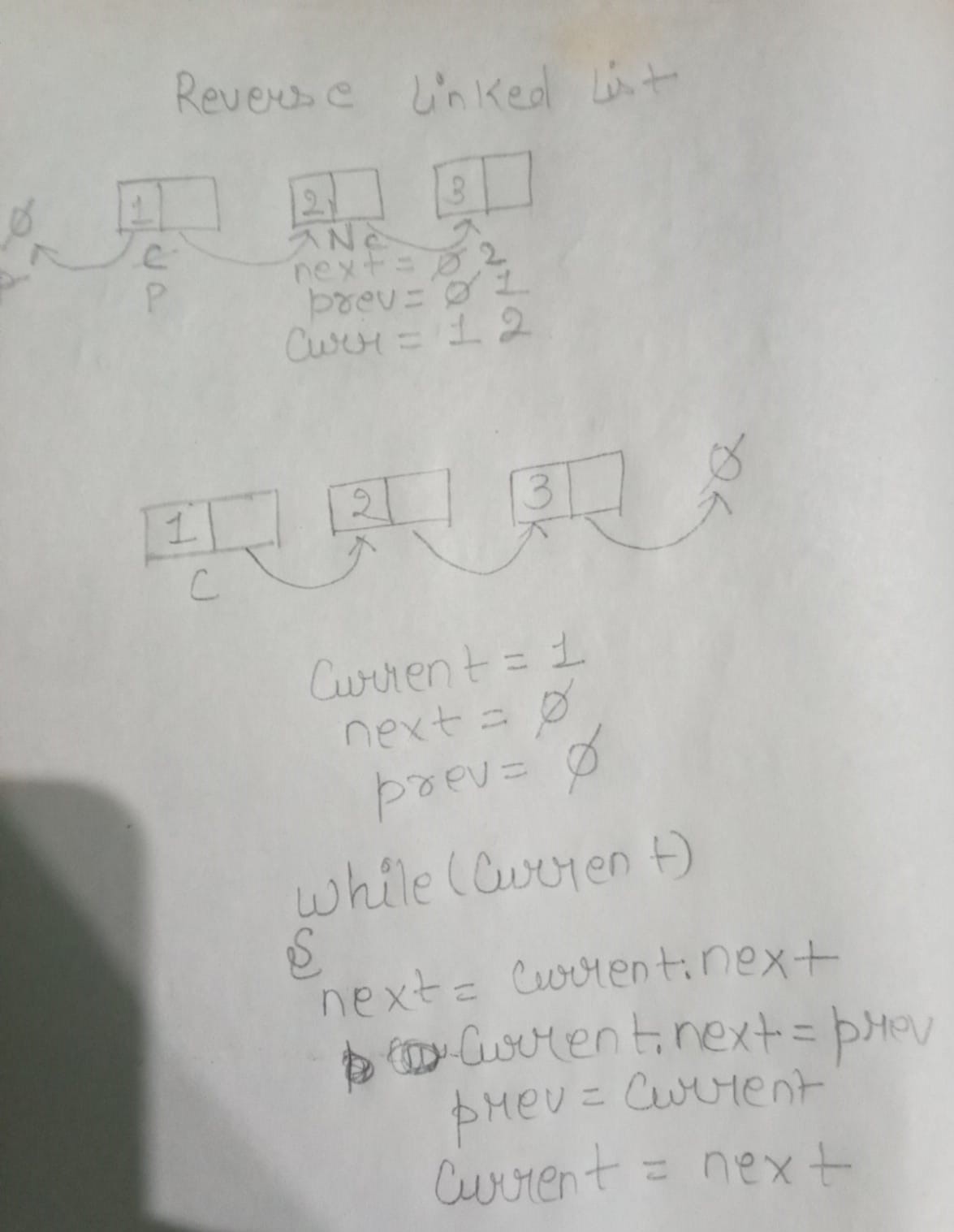
LinkedList.prototype.revrseALinkedList = function() {
let current = this.head;
let next= null;
let prev= null;
while(current){
next = current.next;
current.next = prev;
prev = current;
current = next
}
this.head = prev;
}
Doubly Linked List
How a Doubly LinkedList Looks:
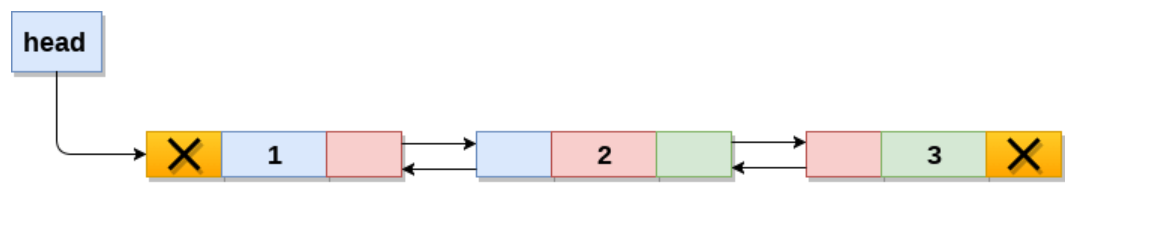
This time, each node has three parts: data, prevNode, and next.
First, we are going to create an empty node.
class Node{
constructor(data, next = null ,prev = null) {
        this.data = data
        this.next = next
        this.prev = prev
   }
}

class DoublyLinkedList{
constructor(){
this.head = null
this.tail = null
}
}
The Node class represents an element in the linked list. Each node contains three properties:
The constructor takes three arguments:
data: This property holds the data or value.
next: This property holds the reference to the next node.
prev: This property holds the reference to the previous node.
The LinkedList class represents the entire linked list.
head: This property holds a reference to the first node in the linked list. If the list is empty, head is set to null.
tail: This property holds a reference to the last node in the linked list. If the list is empty, tail is set to null.
Insert at the begining:
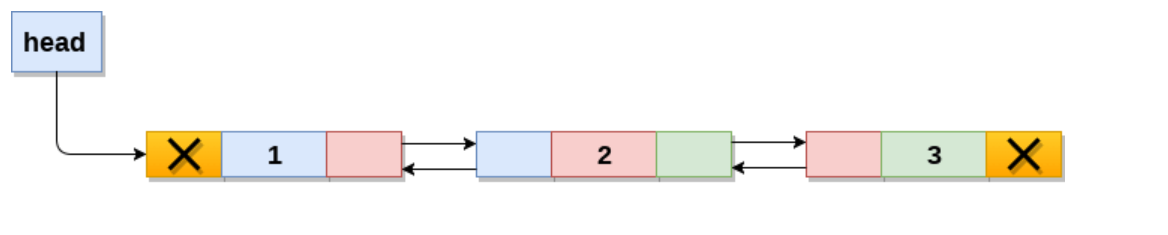
while inserting data in the doubly linked list, we need to consider a few cases
If the head is not null, it means there is already a linked list present, and we need to update the head with the new node.
Because this is a doubly linked list, we have access to the previous node and can simply point the previous node to the new node.
If the head is null, it means there is no linked list present. In this case, we can set the head to the new node.
Because this is a doubly linked list, we also have a tail. If the tail is null, we need to handle it. The interviewer might ask you to do something for the tail as well. In that case, just point the tail to the new node.
We simply point the head to the new node.
DoublyLinkedList.prototype.insertAtStart = function (data) {
//first we take  data and make a node
const newNode = new Node(data,this.head,null)
// after we check head is null or not
if(this.head !== null){
this.head.prev = this.head
}
//if head is null then we make a new node
this.head = prev

//if tail is null we simply point tail to the new Node
if(this.tail === null){
this.tail = newNode
}
}
Insert at the End
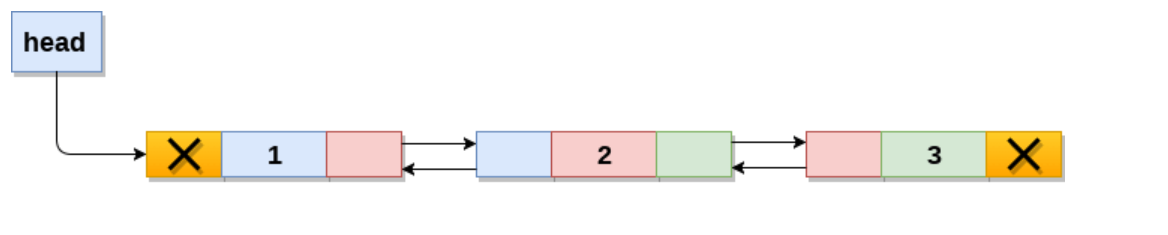
If the tail is not pointing to null, it means that the node is not the tail.
If this is the case, we have access to the next node, and we simply point next to the new node. We also need to point the tail to the new node.
If the head is null, we simply add the new node.
DoublyLinkedList.prototype.insertAtEnd = function (data) {
//first we take data and make node
    const newNode = new Node(data, null, this.tail)
    // after we check tail is null or not
    if (this.tail !== null) {
        this.tail.next = newNode
    }
    this.tail = newNode
//if head is null then we simply add a new Node
    if (this.head === null) {
        this.head = newNode
    }
}
Insert at a given node
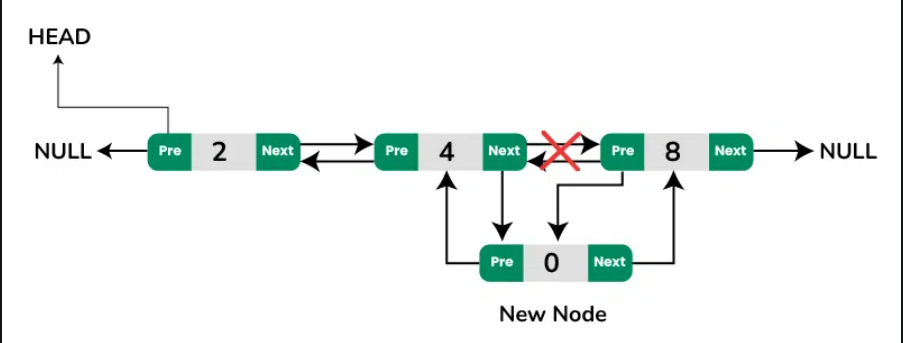
First, we need to create a node that tracks the previous value and the next value.
We take the previous value provided by the user, so we know the previous value. By using prev.next, we can access the next value that is already present in the linked list.
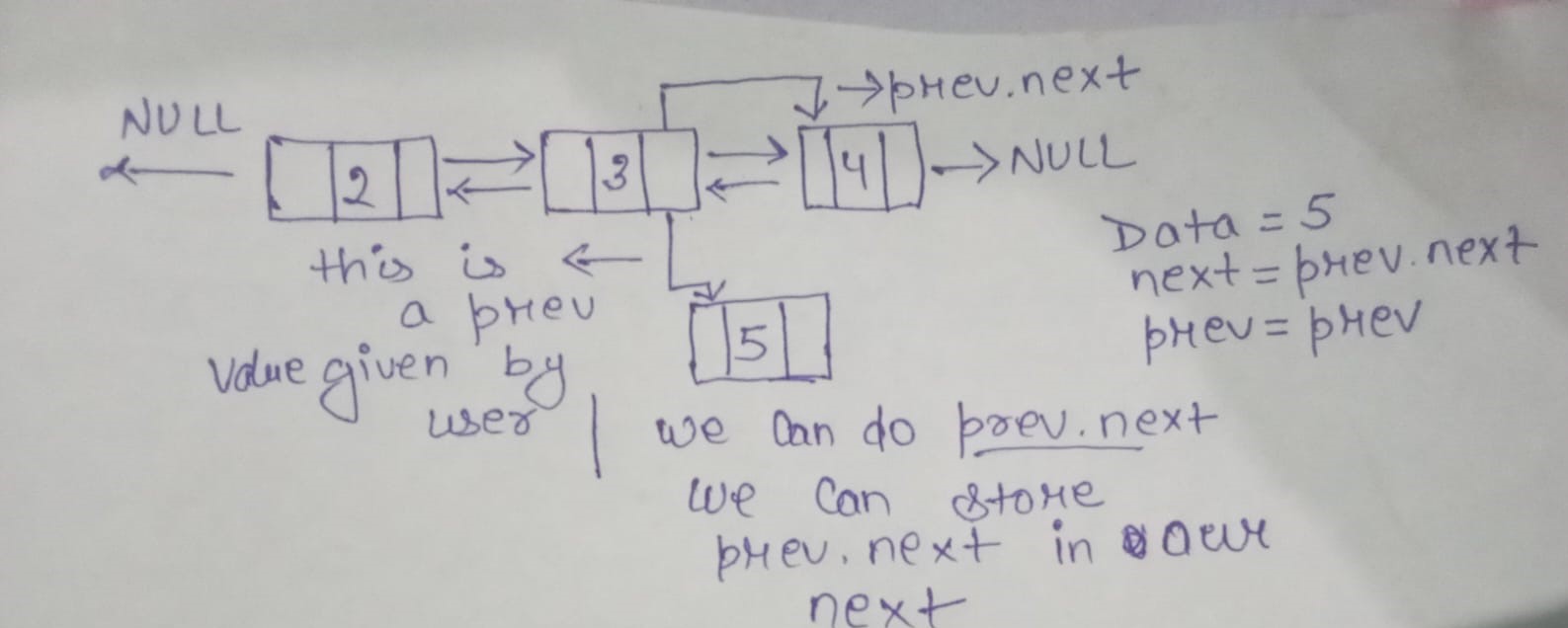
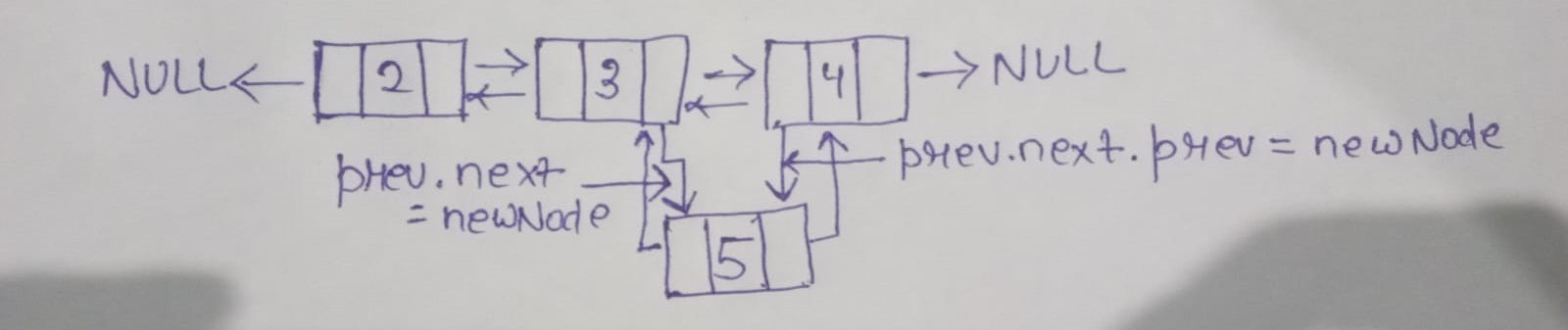
What if prev.next is not null? In that case, we already have access to prev. We can use prev.next.prev to access the next node and point it to the new node. We also have access to prev.next to point it to the new node.
What if prev.next is null? Then we can simply point prev.next to a new node and also update the tail.
DoublyLinkedList.prototype.insertAtAnyPlace = function (data, prevNode) {
//check what if head is null then we simply return null
    if (!this.head) {
        return
    }
//take data and create a node
    const newNode = new Node(data, prevNode.next, prevNode)
  //then prevNode.next is not a nll
    if (prevNode.next !== null) {
        prev.next.prev = newNode
    }
//after that create a newNode
    prev.next = newNode
//after create newNode point the tail
    if (prevNode.next === null) {
        this.tail = newNode
    }

}
Delete first node of doubly Linked List
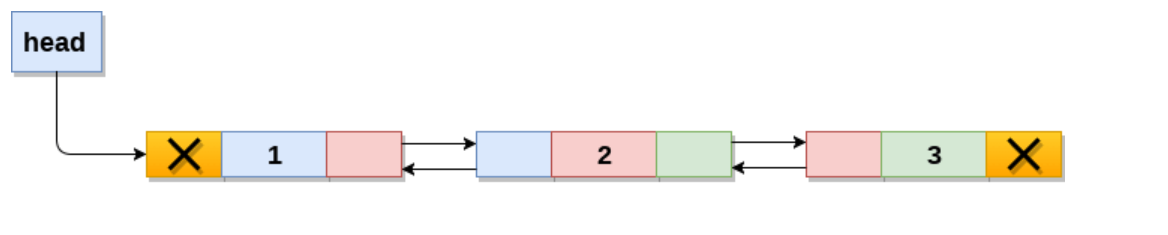
we need to delete the first node of this linked list
What if head.next is not null? In that case, we can overwrite the value of head because we have access to the next node.
What if head.next is null? In this case, we need to handle both the head and the tail. Remember, when we created the head, we pointed both the head and the tail to it. Therefore, we need to set both values to null.
DoublyLinkedList.prototype.DeleteFirst = function () {

    if (!this.head) {
        return
    }

    if (this.head === this.tail) {
        this.head = null
        this.tail = null
    } else {
        this.head = this.head.next
        this.head.prev = null
    }
}
Delete Last node
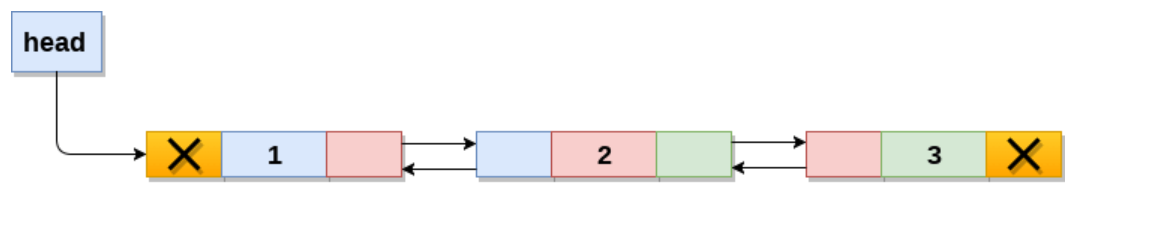
We need to delete the last node of this linked list.
What if there is only one node in the linked list? In that case, we can simply set both values to null.
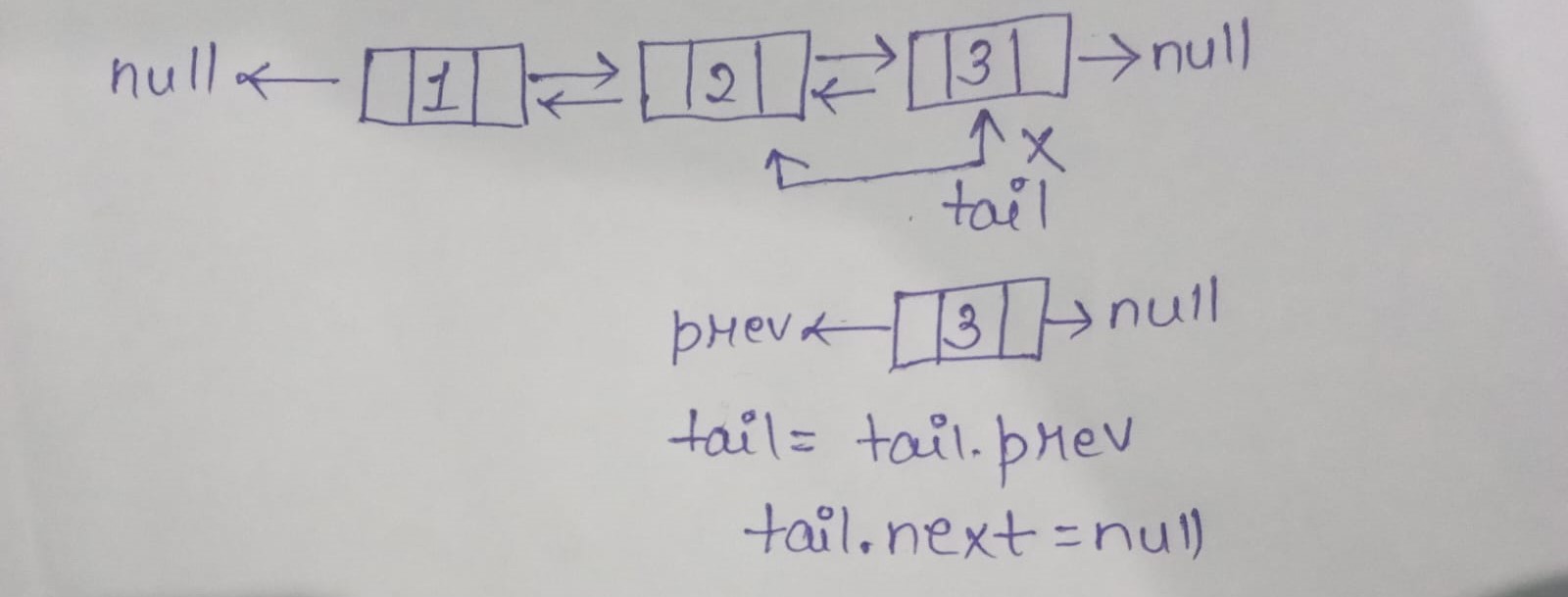
What if the tail is null? In that case, we have access to the previous value. Simply point the tail to the previous node and set its next to null.
DoublyLinkedList.prototype.DeleteLast = function () {
    if (!this.tail) {
        return
    }

    if (this.head === this.tail) {
        this.head = null
        this.tail = null
    }else {
        this.tail = this.tail.prev
        this.tail.next = null
    }
}
Reverse a doubly Linked List
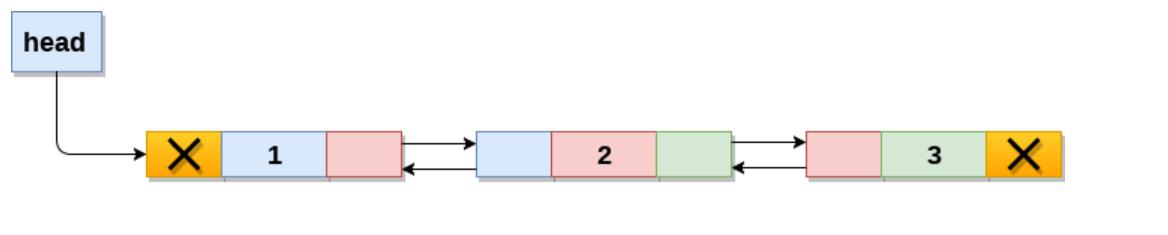
current to the head of the list.
temp to null.
For each node, swap its prev and next pointers.
Move current to the next node in the original list (which is the prev node after swapping).
After the loop, if temp is not null, set the new head and tail of the list.
For each node, swap its prev and next pointers.
DoublyLinkedList.prototype.reverse = function () {
    let current = this.head
    let temp = null
    while (current) {
        temp = current.prev
        current.prev = current.next
        current.next = temp
        current = current.prev
    }
    if (temp != null) {
    this.tail = this.head
    this.head = temp.prev
  }
}


